DeepSeek V4 Flash: Bringing Frontier AI to the Home
Introduction
In a home lab it is now possible to score 88.6% on the Ph.D.-level science question benchmark GPQA Diamond!
The first time a frontier model achieved 88% on GPQA Diamond was GPT-5.1 (high) on 13 Nov 2025:
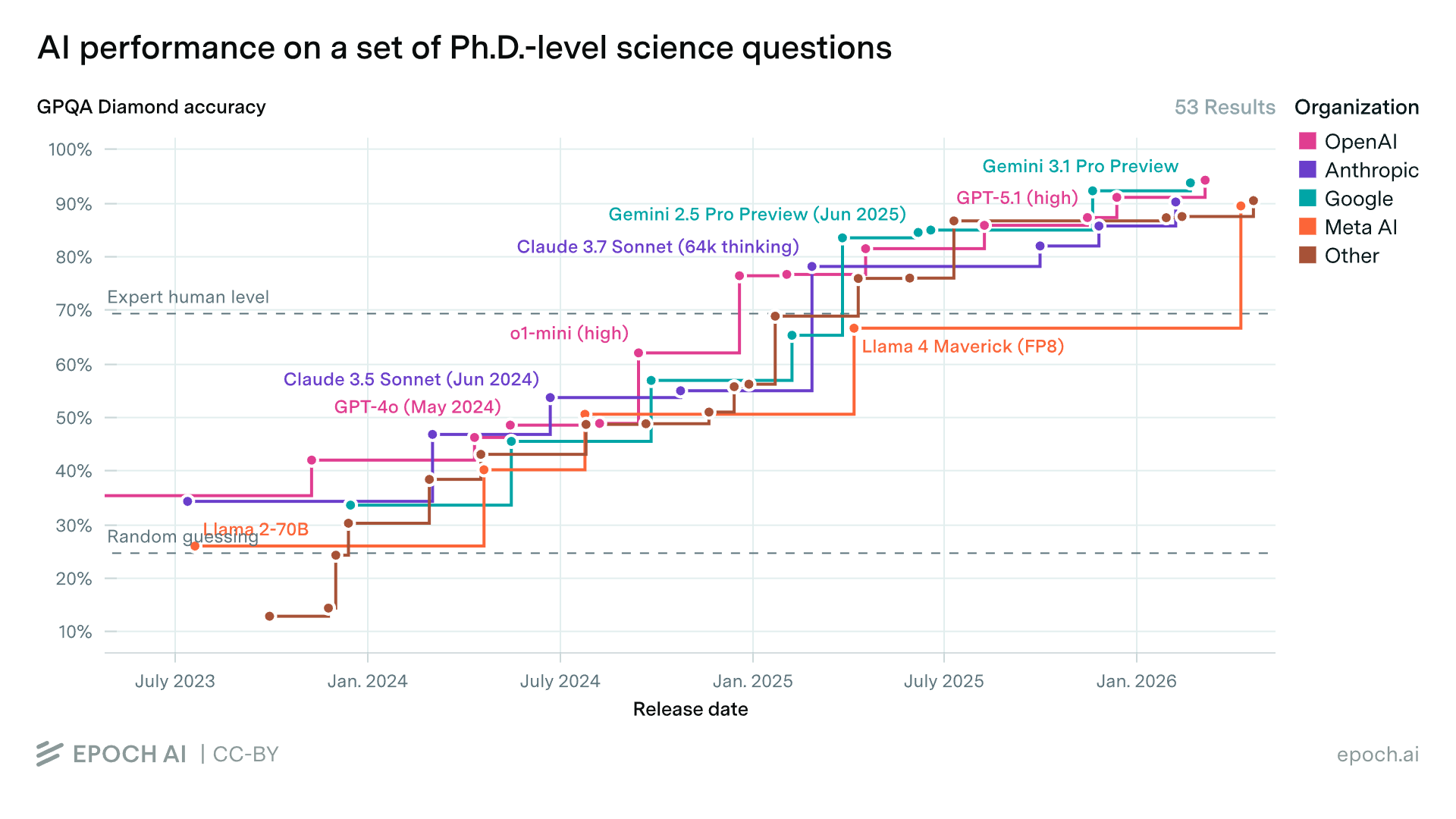
In other words, you can now run an open-weights model at home that is just 6 months behind SOTA commercial frontier models!
Hardware Setup
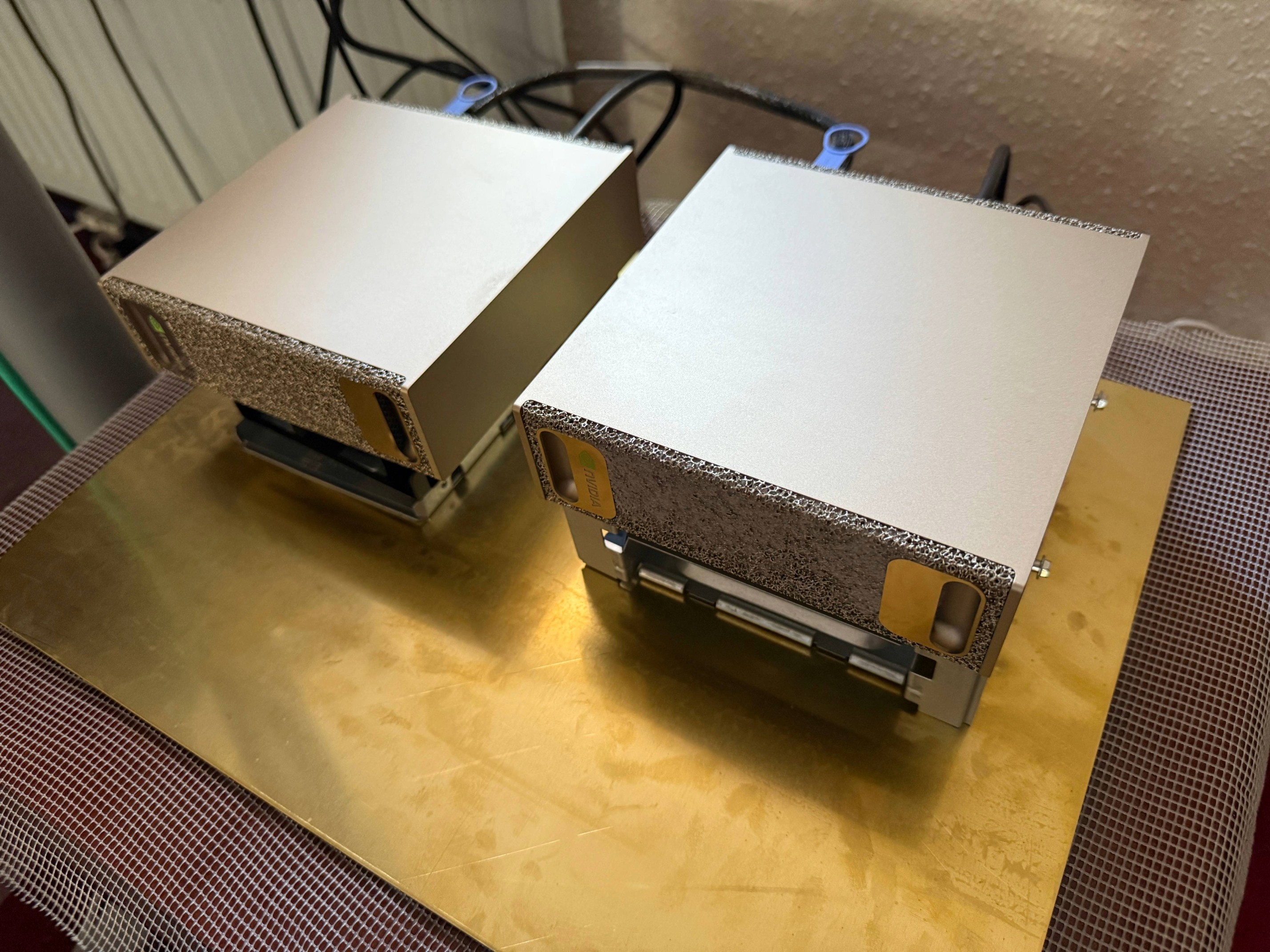
My hardware setup:
- Two NVIDIA DGX Sparks, bought from Scan Computers International Ltd.
- Connected with a QSFP112 cable purchased from DigiKey for GBP 32.00 (ships internationally in just 4 days)
- A 400 mm × 300 mm (Circa A3) × 2.0 mm brass sheet bought from a seller called Metaloffcuts on Amazon for GBP 49.48
I bought the brass sheet to act as a heatsink, and I chose brass for its reasonable
thermal conductivity and aesthetic match to the beautiful gold Sparks! The Sparks are on
top of a couple of drive cages cooled via convection by a large fan blowing air through
the assemblies from front to back (the units intake air from the front and exhaust heat
from their rear). In the picture you can also see the blue QSFP112 cable, a
0.5 metre Amphenol cable (NJAAKR-0006*). This provides a
high speed (25 GB/s) connection between the devices, which will come in useful
shortly...
*Strictly speaking, this cable, NJAAKR0006, is a wider gauge
(30AWG instead of 32AWG) version of the NJAAKK0006 cable mentioned
here.
U.S. customers can buy an official cable direct from the
NVIDIA marketplace.
Network Setup
First I connected the QSFP112 cable to the Sparks' outermost ports (right-hand side when viewed from the rear).
Then I followed the community Network Setup Guide to create a cluster from the Sparks:
Spark 1:
$ sudo tee /etc/netplan/40-cx7.yaml > /dev/null << 'EOF'
network:
  version: 2
  ethernets:
    enp1s0f1np1:
      dhcp4: no
      dhcp6: no        # Explicitly disable DHCPv6
      link-local: []   # Restrict link-local addresses to static IPv4 only
      mtu: 9000
      addresses: [192.168.177.11/24]
    enP2p1s0f1np1:
      dhcp4: no
      dhcp6: no
      link-local: []
      mtu: 9000
      addresses: [192.168.178.11/24]
EOF
Spark 2:
$ sudo tee /etc/netplan/40-cx7.yaml > /dev/null << 'EOF'
network:
  version: 2
  ethernets:
    enp1s0f1np1:
      dhcp4: no
      dhcp6: no        # Explicitly disable DHCPv6
      link-local: []   # Restrict link-local addresses to static IPv4 only
      mtu: 9000
      addresses: [192.168.177.12/24]
    enP2p1s0f1np1:
      dhcp4: no
      dhcp6: no
      link-local: []
      mtu: 9000
      addresses: [192.168.178.12/24]
EOF
Run on both Sparks:
$ sudo chmod 600 /etc/netplan/40-cx7.yaml
$ sudo netplan apply
Then on Spark 1:
$ wget https://raw.githubusercontent.com/NVIDIA/dgx-spark-playbooks/refs/heads/main/nvidia/connect-two-sparks/assets/discover-sparks
$ chmod +x discover-sparks
$ ./discover-sparks
Now the Sparks are connected via RDMA over Converged Ethernet (RoCE), explained here. This is not native InfiniBand, but runs in Ethernet mode.
I tested the bandwidth and latency by running the following:
Bandwidth Test
Spark 2:
$ ib_write_bw -d rocep1s0f1 --report_gbits -q 4 -R --force-link IB

************************************
* Waiting for client to connect... *
************************************
Spark 1:
$ ib_write_bw 192.168.177.12 -d rocep1s0f1 --report_gbits -q 4 -R --force-link IB
---------------------------------------------------------------------------------------
                    RDMA_Write BW Test
 Dual-port       : OFF          Device         : rocep1s0f1
 Number of qps   : 4            Transport type : IB
 Connection type : RC           Using SRQ      : OFF
 PCIe relax order: ON
 ibv_wr* API     : ON
 TX depth        : 128
 CQ Moderation   : 1
 Mtu             : 4096[B]
 Link type       : IB
 Max inline data : 0[B]
 rdma_cm QPs     : ON
 Data ex. method : rdma_cm
---------------------------------------------------------------------------------------
 local address: LID 0000 QPN 0x0279 PSN 0xb8d762
 local address: LID 0000 QPN 0x027a PSN 0x552aa4
 local address: LID 0000 QPN 0x027b PSN 0x34011e
 local address: LID 0000 QPN 0x027c PSN 0xf40d15
 remote address: LID 0000 QPN 0x0278 PSN 0x9a7284
 remote address: LID 0000 QPN 0x0279 PSN 0x933755
 remote address: LID 0000 QPN 0x027a PSN 0xbbfb45
 remote address: LID 0000 QPN 0x027b PSN 0x162679
---------------------------------------------------------------------------------------
 #bytes     #iterations    BW peak[Gb/sec]    BW average[Gb/sec]   MsgRate[Mpps]
 65536      20000            111.57             107.34             0.204742
---------------------------------------------------------------------------------------Latency Test
Spark 2:
$ ib_write_lat -d rocep1s0f1 --report_gbits -R --force-link IB

************************************
* Waiting for client to connect... *
************************************
Spark 1:
$ ib_write_lat 192.168.177.12 -d rocep1s0f1 --report_gbits -R --force-link IB
---------------------------------------------------------------------------------------
                    RDMA_Write Latency Test
 Dual-port       : OFF          Device         : rocep1s0f1
 Number of qps   : 1            Transport type : IB
 Connection type : RC           Using SRQ      : OFF
 PCIe relax order: OFF
 ibv_wr* API     : ON
 TX depth        : 1
 Mtu             : 4096[B]
 Link type       : IB
 Max inline data : 220[B]
 rdma_cm QPs     : ON
 Data ex. method : rdma_cm
---------------------------------------------------------------------------------------
 local address: LID 0000 QPN 0x027e PSN 0x19406
 remote address: LID 0000 QPN 0x027d PSN 0xc06bb7
---------------------------------------------------------------------------------------
 #bytes #iterations    t_min[usec]    t_max[usec]  t_typical[usec]    t_avg[usec]    t_stdev[usec]   99% percentile[usec]   99.9% percentile[usec]
 2       1000          1.92           2.32         1.97                1.97             0.00            2.08                    2.32
---------------------------------------------------------------------------------------
Software Setup
I cloned Arthur Drozdov's fork of the DGX Spark community vLLM Docker repository, maintained by eugr (eugr_nv since becoming an NVIDIA employee!), on the DGX Spark / GB10 User Forum. (This forum is an amazing community for DGX Spark owners and an essential resource for discovering the latest developments on the DGX Spark - this software setup was largely based on the DeepSeek V4 release thread.)
Spark 1:
$ git clone https://github.com/arthur-drozdov/spark-vllm-docker.git
$ cd spark-vllm-docker
Then I switched to the branch on which Arthur Drozdov has added the DeepSeek V4 Flash recipe:
$ git switch add-deepseek-v4-flash-recipeDownload DeepSeek V4 Flash
Next I downloaded the DeepSeek V4 Flash model from Hugging Face. This is the full, unquantised 160 GB Instruct-tuned DeepSeek V4 Flash model, and took 4–5 hours on my FTTC connection.
This command downloads and automatically propagates the model to the other Spark (at about 0.5 GB/s), so you don't have to download it twice:
Spark 1:
$ ./hf-download.sh deepseek-ai/DeepSeek-V4-Flash -c --copy-parallelBuild the Docker Image
Then I built the Docker image and made it available on both Sparks as
vllm-node-dsv4. It uses the fork of vLLM that adds DeepSeek V4 Flash
support on SM12x Blackwell consumer hardware (RTX PRO 6000 Workstation Edition,
RTX 5090, DGX Spark GB10), made by the incredible
jasl9187:
Spark 1:
$ ./build-and-copy.sh --vllm-repo https://github.com/jasl/vllm.git --vllm-ref dda4668b59567416f86956cfe7bbc1eab371a61e --rebuild-vllm -t vllm-node-dsv4 -c 192.168.177.12Starting vLLM
Then I ran vLLM on the cluster:
Spark 1:
$ DOTENV_CONTAINER_NAME=vllm_deepseek_v4_flash_prod nohup ./run-recipe.sh deepseek-v4-flash --no-ray --tp 2 --name vllm_deepseek_v4_flash_prod > deepseek-v4-flash.log 2>&1 < /dev/null &and tailed the log on Spark 1:
$ tail -f deepseek-v4-flash.logStarting Inspect Evals (GPQA Diamond)
In another terminal window on Spark 1, I started the GPQA Diamond evaluation using the Inspect Evals tool made by the UK AISI. This tool is a powerful harness that evaluates large language models to test their capabilities and safety. In this case we will be running GPQA Diamond, but the repository contains many other evals you can try.
Spark 1:
$ git clone https://github.com/UKGovernmentBEIS/inspect_evals.git
$ cd inspect_evals
$ uv sync
$ uv add openai
$ cd src
$ cat > client_ds4_dual_spark_1h_high.sh
# Server: vLLM
export OPENAI_BASE_URL=http://localhost:8000/v1
export OPENAI_API_KEY="no_key_required"

# -M client_timeout=3600 passes a (60 minute) timeout to the underlying OpenAI client
uv run inspect eval inspect_evals/gpqa/ --model openai/deepseek-v4-flash --reasoning-effort high --epochs 4 --max-connections 2 --max-tokens 131072 --token-limit 262144 --time-limit 3600 --max-retries 2 --no-fail-on-error --log-level=http -M client_timeout=3600
$ chmod a+x client_ds4_dual_spark_1h_high.sh
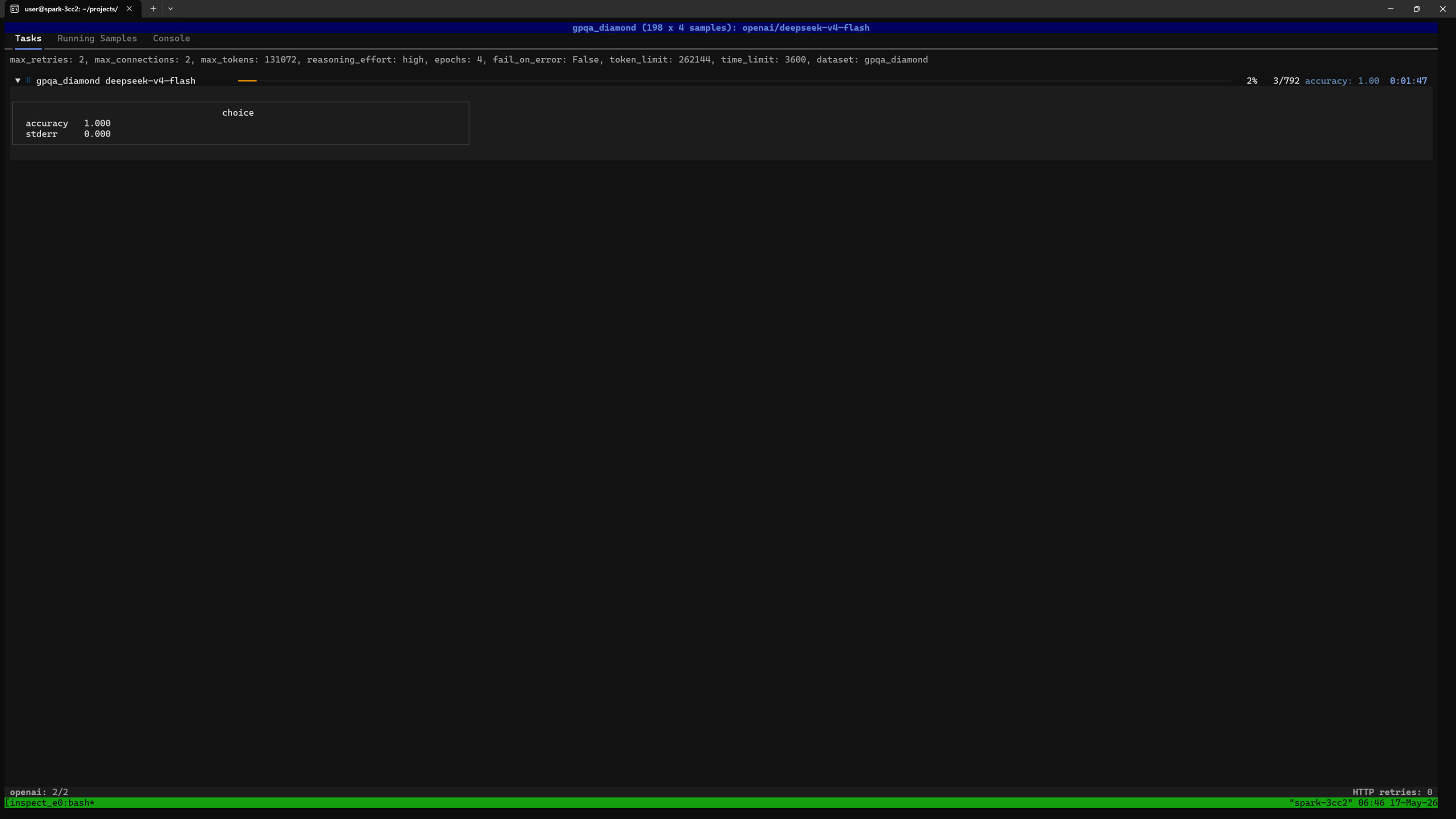
$ ./client_ds4_dual_spark_1h_high.shYou should see a screen like this showing the overall progress. In this case we are running 4 epochs, and each epoch asks the full GPQA Diamond set, comprising 198 questions, so 792 questions altogether:
$ uv run inspect viewThen open http://127.0.0.1:7575 in a web browser running locally on the Spark.
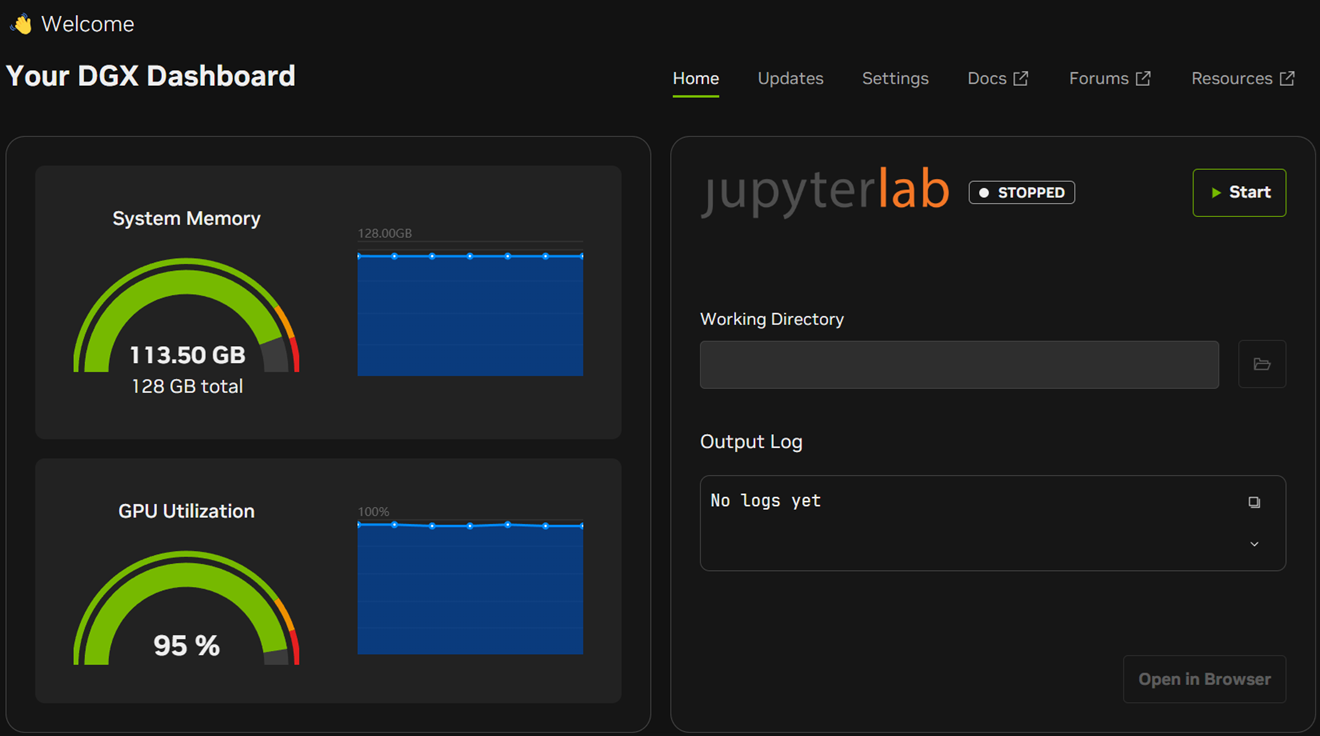
You can verify resource usage using the DGX Dashboard in the NVIDIA Sync tool:
Spark 1:
Spark 2:
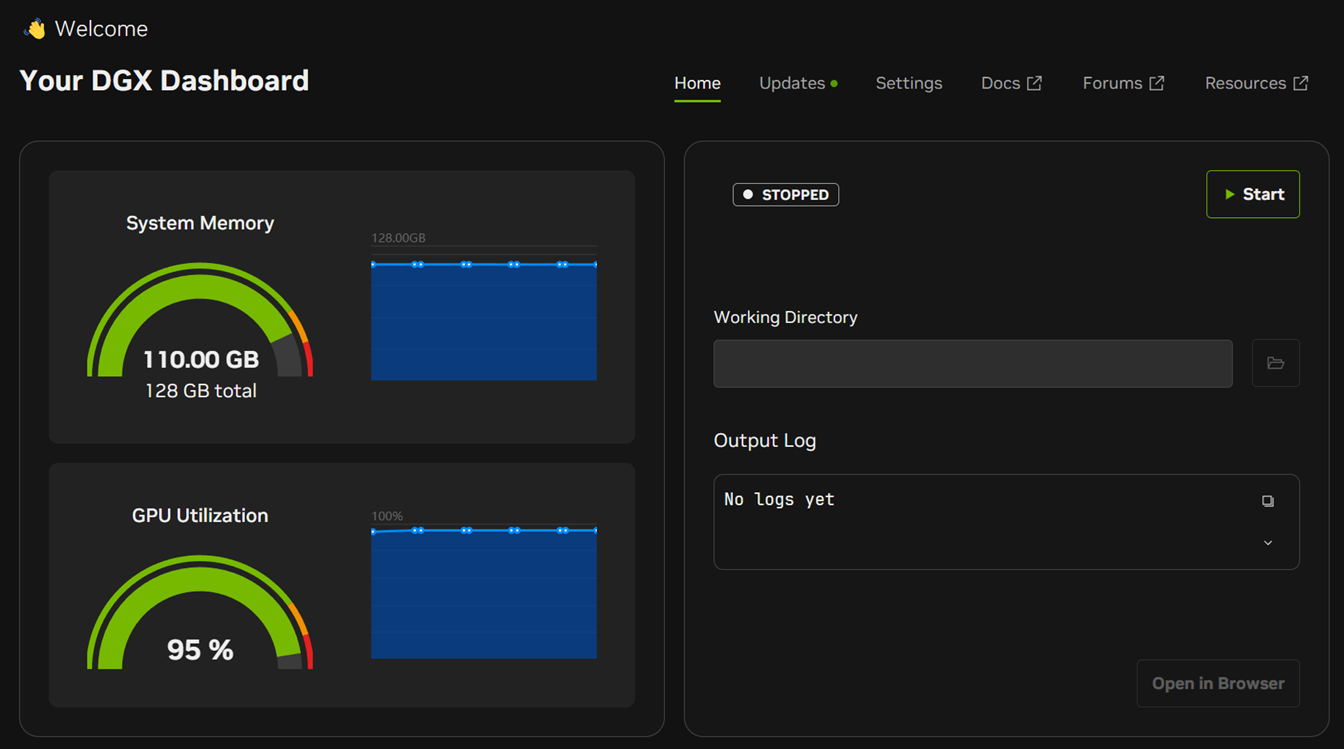
You can verify temperatures etc. using nvidia-smi:
Spark 1:
$ nvidia-smi
+-----------------------------------------------------------------------------------------+
| NVIDIA-SMI 580.142                Driver Version: 580.142        CUDA Version: 13.0     |
+-----------------------------------------+------------------------+----------------------+
| GPU  Name                 Persistence-M | Bus-Id          Disp.A | Volatile Uncorr. ECC |
| Fan  Temp   Perf          Pwr:Usage/Cap |           Memory-Usage | GPU-Util  Compute M. |
|                                         |                        |               MIG M. |
|=========================================+========================+======================|
|   0  NVIDIA GB10                    On  |   0000000F:01:00.0 Off |                  N/A |
| N/A   65C    P0             31W /  N/A  | Not Supported          |     94%      Default |
|                                         |                        |                  N/A |
+-----------------------------------------+------------------------+----------------------+

+-----------------------------------------------------------------------------------------+
| Processes:                                                                              |
|  GPU   GI   CI              PID   Type   Process name                        GPU Memory |
|        ID   ID                                                               Usage      |
|=========================================================================================|
|    0   N/A  N/A          356671      C   VLLM::Worker_TP0_EP0                  97323MiB |
|    0   N/A  N/A          413761      G   /usr/lib/xorg/Xorg                      381MiB |
|    0   N/A  N/A          413974      G   /usr/bin/gnome-shell                    202MiB |
|    0   N/A  N/A          415437      G   .../8278/usr/lib/firefox/firefox        289MiB |
+-----------------------------------------------------------------------------------------+
Spark 2:
$ nvidia-smi
+-----------------------------------------------------------------------------------------+
| NVIDIA-SMI 580.142                Driver Version: 580.142        CUDA Version: 13.0     |
+-----------------------------------------+------------------------+----------------------+
| GPU  Name                 Persistence-M | Bus-Id          Disp.A | Volatile Uncorr. ECC |
| Fan  Temp   Perf          Pwr:Usage/Cap |           Memory-Usage | GPU-Util  Compute M. |
|                                         |                        |               MIG M. |
|=========================================+========================+======================|
|   0  NVIDIA GB10                    On  |   0000000F:01:00.0 Off |                  N/A |
| N/A   56C    P0             30W /  N/A  | Not Supported          |     93%      Default |
|                                         |                        |                  N/A |
+-----------------------------------------+------------------------+----------------------+

+-----------------------------------------------------------------------------------------+
| Processes:                                                                              |
|  GPU   GI   CI              PID   Type   Process name                        GPU Memory |
|        ID   ID                                                               Usage      |
|=========================================================================================|
|    0   N/A  N/A            2659      G   /usr/lib/xorg/Xorg                      126MiB |
|    0   N/A  N/A            2880      G   /usr/bin/gnome-shell                     19MiB |
|    0   N/A  N/A          268816      C   VLLM::Worker_TP1_EP1                  97323MiB |
+-----------------------------------------------------------------------------------------+Performance Analysis
In the tailed log output, this is what we see:
(APIServer pid=82) INFO 05-16 00:23:33 [metrics.py:101] SpecDecoding metrics: Mean acceptance length: 2.42, Accepted throughput: 34.60 tokens/s, Drafted throughput: 48.80 tokens/s, Accepted: 346 tokens, Drafted: 488 tokens, Per-position acceptance rate: 0.873, 0.545, Avg Draft acceptance rate: 70.9%
(APIServer pid=82) INFO 05-16 00:23:43 [loggers.py:271] Engine 000: Avg prompt throughput: 0.0 tokens/s, Avg generation throughput: 62.0 tokens/s, Running: 2 reqs, Waiting: 0 reqs, GPU KV cache usage: 71.8%, Prefix cache hit rate: 10.1%
(APIServer pid=82) INFO 05-16 00:23:43 [metrics.py:101] SpecDecoding metrics: Mean acceptance length: 2.50, Accepted throughput: 37.20 tokens/s, Drafted throughput: 49.60 tokens/s, Accepted: 372 tokens, Drafted: 496 tokens, Per-position acceptance rate: 0.903, 0.597, Avg Draft acceptance rate: 75.0%
(APIServer pid=82) INFO 05-16 00:23:53 [loggers.py:271] Engine 000: Avg prompt throughput: 0.0 tokens/s, Avg generation throughput: 55.8 tokens/s, Running: 2 reqs, Waiting: 0 reqs, GPU KV cache usage: 71.8%, Prefix cache hit rate: 10.1%
(APIServer pid=82) INFO 05-16 00:23:53 [metrics.py:101] SpecDecoding metrics: Mean acceptance length: 2.33, Accepted throughput: 31.80 tokens/s, Drafted throughput: 47.99 tokens/s, Accepted: 318 tokens, Drafted: 480 tokens, Per-position acceptance rate: 0.838, 0.487, Avg Draft acceptance rate: 66.2%
(APIServer pid=82) INFO 05-16 00:24:03 [loggers.py:271] Engine 000: Avg prompt throughput: 0.0 tokens/s, Avg generation throughput: 59.9 tokens/s, Running: 2 reqs, Waiting: 0 reqs, GPU KV cache usage: 71.8%, Prefix cache hit rate: 10.1%
At the time the log was captured, vLLM is generating ~60 tokens/sec across two simultaneous requests. So each response is outputting around 30 tokens/second which is a fantastic result for a near-frontier model on local hardware.
This can be attributed to many factors, some relating to model architecture and some relating to its deployment.
Architectural Improvements Over DeepSeek V3.2
The biggest performance improvements are in the model itself. In DeepSeek's tech report, they say:
...DeepSeek-V4-Flash pushes efficiency even further: in the 1M-token context setting, it achieves only 10% of the single-token FLOPs and 7% of the KV cache size compared with DeepSeek-V3.2.
The reduced KV cache size is what allows us to run such long contexts.
Mixture of Experts (MoE)
The DGX Spark has 273 GB/s of memory bandwidth, which is modest by data centre standards. LLM inference is memory bandwidth-limited: for every generated token, the GPU must load every relevant weight from memory.
With fully dense models (such as Qwen3.6-27B), every weight in the model gets loaded for every token. DeepSeek V4 takes a different approach. As a Mixture of Experts (MoE) model, DeepSeek V4 Flash only needs to load 13B active parameters out of its 284B total. This brings per-token memory traffic down by ~22× for this model, into a regime where the Spark's bandwidth is tractable.
Expert Parallelism
The model is using expert parallelism (EP=2), as can be seen in the vLLM log:
(Worker_TP0_EP0 pid=207) INFO 05-17 13:42:24 [expert_map_manager.py:245] [EP Rank 0/2] Expert parallelism is enabled. Expert placement strategy: linear. Local/global number of experts: 128/256.This means that 128 routed experts are on Spark 1 and 128 routed experts are on Spark 2. Each expert's weights are wholly located on a single Spark, reducing inter-node communication.
Tensor Parallelism
In addition to expert parallelism, tensor parallelism (TP=2) is used for the model's dense components, such as the shared expert, attention projections and embeddings. The weights are sliced across both devices; each Spark holds half the weights for these components, and they compute their halves in parallel.
Multi-Token Prediction (MTP)
Multi-Token Prediction (MTP) is DeepSeek V4's built-in speculative decoding. The MTP heads draft two upcoming tokens, which the main model verifies in a single forward pass. The logs show the first proposal is accepted ~90% of the time and the second ~60%. On average each forward pass commits 2.5 tokens instead of 1, giving roughly a 2.5× throughput multiplier over non-speculative decoding.
You can learn more about MTP from this video.
Device Parallelism
A side effect of spreading the computation across two devices is that this doubles the available memory bandwidth giving 546 GB/s across the pair. As we'll see, this aggregate bandwidth is ultimately what bounds concurrent capacity.
It also means that the heat generated is split across two cooling solutions, so both Sparks run cooler (than if the model were hypothetically running on just one device). In my case the room temperature was around 25 °C and the Sparks were running at approximately 65 °C and 56 °C. I didn't notice any throttling.
Request Parallelism
Both vLLM and Inspect Evals were configured to handle two requests simultaneously. Request parallelism increases overall throughput (tokens per second across all requests) at the cost of per-request latency. The key-value cache is also divided between concurrent requests, effectively reducing the maximum context length each request can use.
Final Result
42 hours and 8 million tokens later, the final result was shown:
╭────────────────────────────────────────────────────────────────────────────────────────────╮
│gpqa_diamond (198 x 4 samples): openai/deepseek-v4-flash                                    │
╰────────────────────────────────────────────────────────────────────────────────────────────╯
max_retries: 2, max_connections: 2, max_tokens: 131072, reasoning_effort: high, epochs: 4,
fail_on_error: False, token_limit: 262144, time_limit: 3600,
dataset: gpqa_diamond_74187e36ccadd6a06b1d98d13e064fed

total time:                                              1 day, 17:43:45
openai/deepseek-v4-flash                                 8,514,389 tokens [I: 196,836, O: 8,317,553]

choice
accuracy  0.886
stderr    0.020

Log: logs/2026-05-14T09-04-40+00-00_gpqa-diamond_MLpakcTtwBMQ46o8mmGxA8.eval
The accuracy was very consistent through the 4 epochs, and at high
reasoning effort, my result of 88.6 is statistically indistinguishable
from DeepSeek's published figure for DeepSeek V4 Flash at High reasoning
(87.4).
The official GPQA Diamond (Pass@1) results in their tech report are as follows:
| DeepSeek V4 Model | Non-Think | High | Max |
|---|---|---|---|
| Flash | 71.2 | 87.4 | 88.1 |
| Pro | 72.9 | 89.1 | 90.1 |
Average generated token rate was
8317553 / ((((24 + 17) * 60) + 43) * 60 + 45) = 55 tokens per second.
Scaling Behaviour
After the eval completed, following jasl9187's comment on the forum:
Decode is memory bandwidth-limited.I experimented with higher concurrency to characterise the system's scaling behaviour.
When I increased the concurrency from two to three requests, the overall token rate increased to 66 tokens per second (a ~10% gain), while the per-request rate dropped to 22 tokens per second, as expected.
Beyond three requests, four requests caused a sharp drop in overall throughput and fluctuating GPU Utilization on the dashboard where it was steady before:
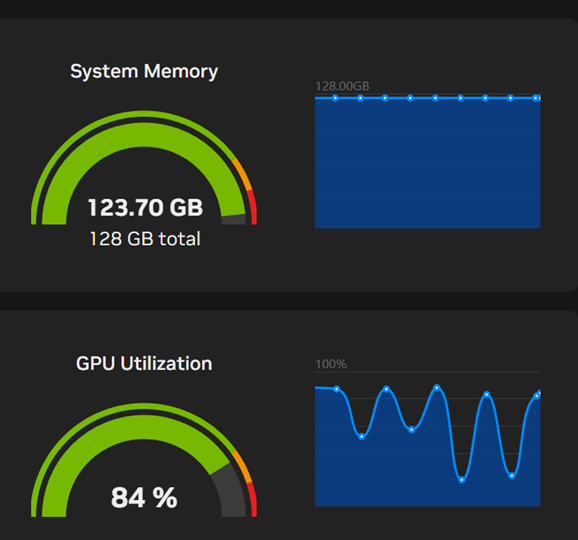
Discussion
This is due to the memory bandwidth bottleneck discussed earlier. As the number of concurrent requests for an MoE model increases, so does the number of experts required to serve those requests. The MoE compute advantage prevails, as only a subset of the model's weights need to be applied to generate the tokens in each response.
However, the story for memory bandwidth is completely different. As the number of experts in the union of required experts increases, more pressure is exerted on the memory subsystem until the available bandwidth is exhausted. As decode is memory-bandwidth limited, this ultimately determines how much we can scale.
I tested this by measuring the overall throughput in three 4-prompt scenarios:
- 4 identical prompts → 82-86 tokens/s
- 4 similar (mathematical) prompts → 76-79 tokens/s
- 4 completely different prompts → 60-64 tokens/s
Future Directions
- Continue exploring the behaviour of the model at large contexts/concurrencies
- Score DeepSeek V4 Flash against other benchmarks
- Benchmark DwarfStar 4, a 2-bit quantised port of DeepSeek V4 Flash designed to run on a single Spark or Mac, by Salvatore Sanfilippo (author of Redis) to measure any impact of quantisation on GPQA Diamond accuracy
- Continue evaluating new open weights models as they are released, to track their progress against that of frontier models
Conclusion
A combination of advances in consumer hardware as well as model architectures and the whole inference stack has brought unprecedented performance to the home. Using standard benchmarks such as those in the Inspect Evals tool, we can empirically quantify these improvements, allowing us to measure this progress over time.
On a personal note, I would like to thank all the engineers who selflessly share their time and work in public, without which none of this would be possible. I am indebted to their generosity.
References
- Official release announcement from DeepSeek: https://api-docs.deepseek.com/news/news260424
- Open weights: https://huggingface.co/collections/deepseek-ai/deepseek-v4
- Useful background: https://insiderllm.com/guides/deepseek-v4-flash-vs-pro-guide/
Contact
If you have any comments or questions feel free to email me at fresh.ink3478@fastmail.com.